- JET brand moments
- Marketing and upsell cases
- Time or speed related information
Typography
PIE typography works with our layouts to present content in a clear hierarchy and in a way that's easy to read.
Font families
We use three different font families for our products and communications.
JET Sans Digital
This is our primary font family.

Arial
Used only as a fallback font.

PT Mono
Used only for snippets of code.

Our type scale
Our type scale uses multiples of 4 for type sizes as well as line height, helping it align to our 4px vertical grid.

Responsive type
We assign different values to some of our typographic styles depending on the size of users’ screens. Wider screens use bigger type sizes and more generous spacing, while narrow screens use tighter and smaller type settings.
Here’s an example of how our $heading-L looks on wide and narrow screens.
Wide screens
Screen size: >768px Text size: 28px • Line size: 32px

Narrow screens
Screen size: <768px Text size: 24px • Line size: 32px

Only our heading and subheading typographic styles are responsive. Our body styles are the same for all screens.
Font weights
Font weight refers to a value assigned to your font which determines how bold or light your text will seem. We use three types of font weight.
Extra-black

Black

Extra-bold

Bold

Regular

Font weights are important when adding emphasis and hierarchy to your designs. A bold font weight will always draw the user’s attention more than a lighter weight. When using both weights in your paragraphs be mindful of this guidance to ensure you create the correct balance.
To keep the hierarchy and make things a bit simpler we use bold weights on all our headings and button styles on all themes. Body copy, subheadings and captions use our regular weight by default, although our body and caption styles also allow fonts to be bolded to add emphasis to a word or small phrase.
Font styles
Font styles refer to the text decorations used to emphasise different features of our typographic styles.
Italic
We use italics to make type feel more dynamic and to transfer a JET brand specific moment, it can also be used to imply motion which references our service as a delivery business.
Think about context and hierarchy, if the information in your heading is the most relevant information and transfers a JET brand moment, then consider using an italic style.

- Text below 16pt
- Big blocks of text where readability would be compromised
- Non JET related names or brands
- Functional parts of the UI like CTAs or Tags
Underline
We use underlines for interactive elements such as links, especially when they are placed inside a block of text.

Strikethrough
We use this style when indicating something is no longer valid, but can still be read by users so they can understand the context.

Alignment
This property defines the horizontal alignment of the text. It includes three types of alignment.
Left aligned
This is the preferred way to align text within our products. Left-aligned text performs better for readers because it helps users to easily identify the start of a new line.

Centre aligned
This alignment should be used sparingly, and should never be considered as the primary way to align text in our designs unless there is a specific need for it to be used.

Right aligned
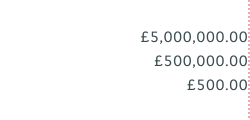
This alignment should also be used sparingly. This approach is usually found in chunks of complex numeric data, where alignment of the decimals is key to assist readability.
Line length
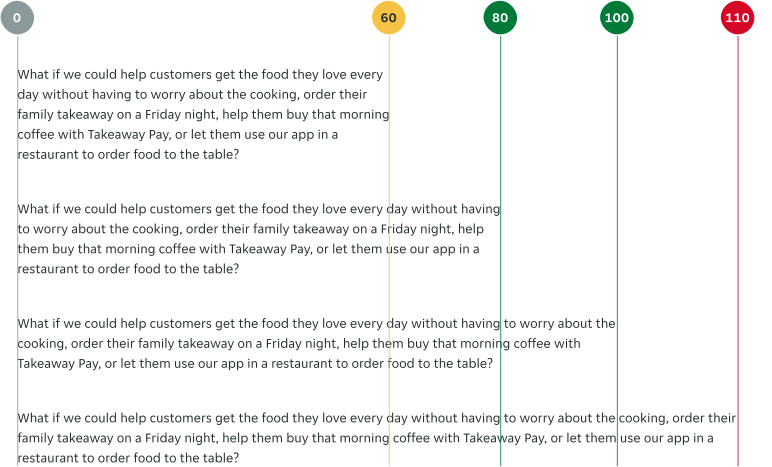
Setting the right line length is key to the readability of the text in our products. With that in mind, a good practice is to keep the length between 80 and 100 characters per line, with a minimum of 60.
Paragraph spacing
It represents the amount of white spacing between two paragraphs of your text. Keeping consistent paragraph spacing measures throughout your products will help the user understand the hierarchy of the information and will make your texts easier to read. We use three measures.
Paragraph Spacing 1
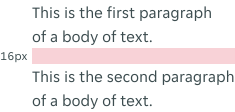
This is the most commonly-used paragraph spacing measure. It uses 16px between paragraphs.
Paragraph Spacing 2
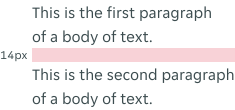
A paragraph spacing measure used for longer bits of text where spacing is key. It uses 14px between paragraphs.
Paragraph Spacing 3
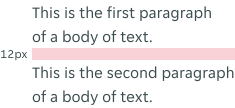
An exceptional measure used only where the other options pose a problem to the overall layout. It uses 12px between paragraphs.
Letter spacing
Letter spacing is used to determine the horizontal spacing between text characters. In digital applications this has been kept to 0px (standard spacing) for all typographic styles.